
ERP, WMS and TMS Integration: How to Unify Logistics Data Without Replacing Your Systems
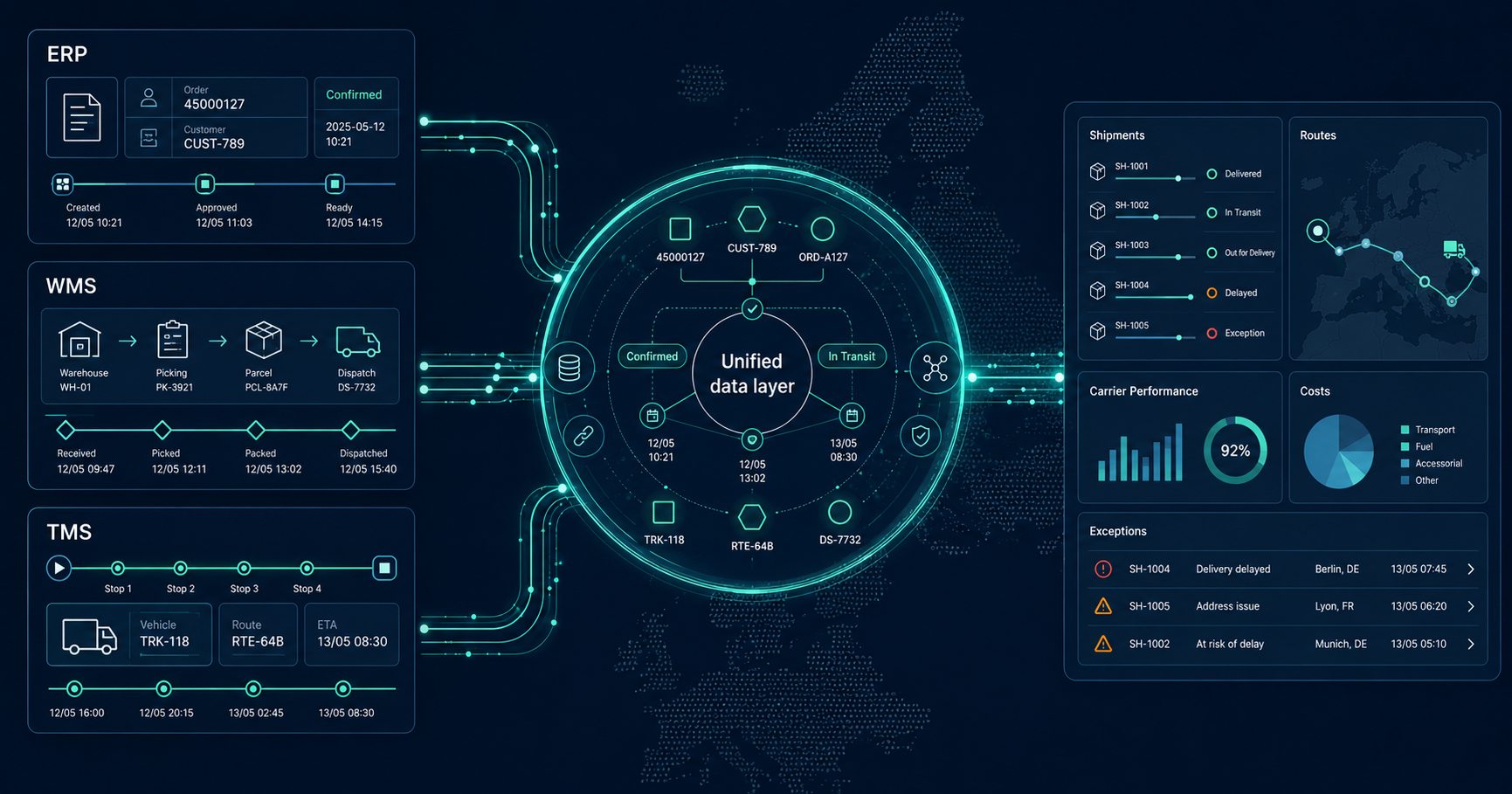
A company may have a modern ERP, a functional WMS, a separate TMS, telematics, accounting software, and portals for several carriers. Yet part of its day-to-day logistics management may still take place in Excel, emails, and manually assembled reports.
This does not automatically mean that any of the systems is failing. Each system usually describes a different part of the operation, uses different identifiers, and updates its data at a different time.
The problem becomes visible when the company needs to answer seemingly simple questions:
- How many shipments are actually delayed?
- Which shipment status is correct?
- What were the planned and actual kilometres?
- How much did a specific transport operation really cost?
- Which carrier repeatedly fails to meet the agreed SLA?
The answer is often not available in one system. Data from ERP, WMS, TMS, carriers, telematics, and accounting must be connected.
In this article, we explain why data diverges across logistics systems, how to define the right source of truth, and how to create a shared operational view without immediately replacing the existing infrastructure.
This is also the principle behind Nodali – a data and control layer for modern logistics.
One Operation, Several Versions of Reality
Consider a typical order.
The order is created in an e-commerce platform and transferred to ERP. ERP records it as a commercial document and may contain customer information, pricing, delivery terms, and billing data.
In WMS, the same order becomes warehouse tasks. WMS manages stock availability, picking, packing, dispatch, and the possible division of the order into several parcels.
TMS works with the transport operation. It may combine several shipments into one route, assign a vehicle or carrier, and create planned departure and delivery times.
The carrier then uses its own tracking statuses. Telematics records the actual vehicle movement. Accounting or the carrier invoice reveals the final cost only later.
Each system therefore answers a different question:
- ERP: What was ordered, by whom, and under which commercial terms?
- WMS: What was picked, packed, and dispatched?
- TMS: How was the transport planned and executed?
- Telematics: Where did the vehicle actually travel?
- Carrier: Which status exists within the external transport network?
- Accounting: Which costs were ultimately invoiced?
Different figures do not necessarily indicate an error. They may simply describe another part of the process or a different point in time.
The error begins when these figures are treated as though they mean the same thing.
Why ERP, WMS and TMS Data Commonly Disagrees
1. Each System Works with a Different Entity
An order, shipment, parcel, transport, route, and stop are not the same object.
One order may contain several shipments. One shipment may be divided into multiple parcels. Several shipments may be combined into one transport operation, and one route may contain dozens of stops.
If the number of ERP orders is compared directly with the number of TMS transports, the results will naturally differ.
2. Systems Use Different Identifiers
A single shipment may simultaneously have:
- an e-commerce order number
- an internal ERP number
- a WMS dispatch number
- a TMS transport number
- a carrier tracking number
- an invoice line reference
Without a reliable relationship between these identifiers, data must be joined using combinations of addresses, timestamps, customers, or other less precise attributes.
3. Identical Status Names May Mean Different Things
A “dispatched” status in WMS may mean that the shipment physically left the warehouse. In ERP, it may only mean that the issue document was closed. A similar status may appear in the carrier system only after the first physical scan.
The same label therefore does not necessarily represent the same operational event.
The opposite is also true: different labels may mean the same thing. One carrier may use “Delivered”, another “Completed”, and a third its own numeric status code.
4. One System Shows the Plan, Another Shows Reality
TMS commonly contains planned distance, timing, and capacity. Telematics or the driver's mobile application shows what actually happened.
If a report combines planned and actual values incorrectly, it may produce a misleading result. A route may still appear on time according to the plan while it is already accumulating delay in reality.
5. Events Occur and Arrive at Different Times
At least two timestamps matter for logistics data:
- when the event actually occurred
- when the information reached the destination system
A driver may confirm delivery at 10:15, but the data may not be transmitted until 11:02 because connectivity was unavailable. If the system uses only the receipt time, it may evaluate the SLA incorrectly.
6. Updates Are Asynchronous or Fail
Integrations between systems rarely run at exactly the same moment. One system sends data immediately, another every few minutes, and another only through a daily batch export.
An API may also be temporarily unavailable, an import may fail, or a particular record may be rejected. Without monitoring the integration flows, one system may contain a new value while another still uses the previous one.
7. The Order Changes During the Operation
A customer may change the address, a shipment may be split, an item may be cancelled, or delivery may be redirected to another collection point.
If the change reaches only some of the systems, several different versions of the same case are created.
8. Part of the Process Is Still Manual
Manual adjustments are not inherently wrong. They are often essential in real operations. The problem occurs when it is impossible to trace:
- who changed the value
- why it was changed
- in which system the change originated
- whether the change should also reach other systems
9. Actual Costs Arrive Later
During planning, only a tariff or estimated price may be available. The final invoice may later include a fuel surcharge, tolls, waiting time, returns, cash-on-delivery fees, oversized parcel charges, or another additional service.
Without connecting operational data to invoicing, the company compares the plan with an incomplete version of reality.
Which System Should Be the Source of Truth?
A common mistake is trying to designate one system as the universal source of truth for the entire logistics operation.
In practice, it is more useful to define the source of truth for individual domains or attributes.
For example:
- ERP may be the source of truth for the customer, commercial terms, and billing data.
- WMS may be the source of truth for the completion of picking and the items actually dispatched.
- TMS may be the source of truth for the planned route, assigned vehicle, and selected carrier.
- Telematics may be the source of truth for actual vehicle movement.
- Carrier tracking may be the source of truth for events in the external transport network.
- Accounting or the approved invoice may be the source of truth for the final invoiced costs.
A shared data layer does not choose a single winning system. It maintains relationships between sources, records the origin of each value, and creates a unified operational view.
For every important value, it should be possible to trace:
- which system it came from
- when it originated
- when it was received
- whether it was subsequently changed
- which rules were used during unification
Why a Dashboard or Power BI Alone Does Not Solve the Problem
Business intelligence tools are highly useful for data visualisation and analysis. On their own, however, they do not automatically resolve the meaning, quality, and operational relationships of the input data.
A dashboard can display exactly what was loaded into it. If the relationships between an order, shipment, transport, and cost have not been resolved correctly, it will merely present inconsistent data in a clearer format.
Before a reliable report can be created, the company must address:
- identifier mapping between systems
- unification of statuses and events
- the distinction between plan and actual performance
- rules for conflicting values
- duplicate or missing records
- latency across individual sources
- change history
- monitoring of failed imports
Another difference is the ability to trigger an operational action.
A dashboard may show that a shipment is delayed. A control layer can additionally create an exception, assign responsibility, record the resolution, and trigger a follow-up workflow.
This is not a choice between a data layer and BI. A well-designed data layer can instead become a reliable source for Power BI, custom dashboards, and other analytical tools.
What a Shared Logistics Data Model Should Contain
A shared model does not have to copy the structure of one particular ERP, WMS, or TMS. It should describe logistics reality across the systems.
It may typically contain entities such as:
- order
- shipment
- parcel or handling unit
- transport operation
- route
- stop
- customer and recipient
- carrier and transport service
- vehicle and driver
- warehouse or depot
- operational event
- exception
- cost item
Alongside a unified identifier, each record should preserve identifiers from the original source systems.
For events, it is important to distinguish:
- event type
- actual event time
- time received by the data layer
- source system
- location or coordinates
- original source status
- unified operational status
This type of model makes it possible to compare data without forcing every system to adopt the same internal structure.
How to Connect ERP, WMS and TMS Without Replacing Them
Integration does not have to begin as a large transformation project.
Depending on the capabilities of each system, the connection may use:
- REST APIs
- webhooks
- read-only database access
- SFTP
- CSV or XLSX exports
- regular data feeds
- automatically processed reports
- a custom connector for a legacy system
Not every source has to be connected in real time from the beginning. A regular export may be sufficient for the first pilot if it allows the data model and the practical value of the result to be validated.
The important point is to design the integration so that the transfer method can later be changed without rebuilding the entire shared model.
Three Layers of Reliable Integration
1. Connect: Receive the Data Reliably
The first layer manages source connections, regular ingestion, format validation, error records, and retries for failed transfers.
Its purpose is not only to receive data, but also to detect when expected data did not arrive or arrived in an invalid form.
2. Understand: Unify the Meaning
The second layer maps identifiers, statuses, events, and relationships between individual entities.
This is where three different tracking codes from separate carriers may be translated into the unified status “delivered”, or where a specific invoice line is matched to a shipment and route.
3. Act: Respond to the Operational Situation
The third layer enables alerts, exceptions, and workflows based on the unified data.
For example:
- a shipment has not received the expected status within a defined time
- actual distance exceeded the planned limit
- a carrier failed to meet the SLA
- the invoiced price differs from the expected price
- a transport document or confirmation is missing
This turns integration from passive data movement into a practical operational management tool.
How to Start with a Small Pilot
The safest route is usually not to connect every system and the entire operation at once.
A better approach is to begin with one question that the company cannot currently answer reliably.
A pilot use case may be:
- How many shipments were actually delivered on time?
- Which carrier has the highest delay rate?
- Where is the greatest difference between planned and actual distance?
- Which carrier surcharges do not match the ordered service?
- How much time is spent assembling a weekly operational report manually?
A typical process may consist of four steps:
1. Select a Specific Problem
The problem should have a clear owner, accessible data, and a benefit that can be measured in practice.
2. Connect Only the Necessary Sources
For carrier performance, data from ERP or the e-commerce platform, dispatch information from WMS, and carrier tracking may be sufficient. Telematics and the full accounting system may not be required in the first phase.
3. Validate the Data Using a Real Period
The result should be compared with actual operations, manual checks, and the knowledge of people who manage the process every day.
4. Expand Only What Creates Value
Additional sources, dashboards, and automations should be introduced according to the results of the pilot.
Practical Examples of a Shared View
External Carrier Performance
Orders from the e-commerce platform or ERP are connected with WMS dispatch data and carrier tracking events.
The company can then compare delivery speed, first-attempt delivery success, delays, returns, and performance by region or service.
More information about this use case is available on the Nodali for E-commerce page.
Planned Versus Actual Route Execution
The TMS plan is connected with telematics data and actual timestamps from individual stops.
The result may provide visibility into deviations, waiting time, delayed departures, unplanned distance, or productivity differences between routes.
More information is available on the Nodali for In-house Logistics page.
Cost and Invoice Verification
The ordered transport service is compared with the planned price, actual transport execution, and invoiced line items.
The company can identify unexpected surcharges, incorrect rates, duplicate items, or costs that cannot be assigned to a specific shipment.
Operational Exceptions
Unified data can be used to identify shipments without an expected status, missing documents, breached SLAs, or unusual deviations.
Instead of manually reviewing several portals, the operation receives a list of specific cases that require attention.
How to Recognise the Need for a Shared Data Layer
Typical signals include:
- different departments use different figures for the same metric
- a regular report is created by copying several exports
- it is unclear which system contains the correct shipment status
- transport costs are known long after the transport is completed
- carrier performance is evaluated manually
- an operational problem becomes visible only after a customer complains
- integration failures occur without a clear alert
- legacy internal systems cannot be replaced easily
- Excel serves as the primary place where operational data is connected
The presence of Excel is not itself a problem. The problem begins when a spreadsheet replaces missing relationships between critical operational systems and its accuracy depends on the manual work of one person.
How Nodali Approaches Logistics Integration
Nodali is not being built as a replacement for ERP, WMS, or TMS.
It creates a shared data and control layer above the available systems. This layer unifies logistics entities, preserves links to source data, and supports operational dashboards, metrics, exceptions, and follow-up automation.
A pilot may begin with only one data source, one carrier, or one part of the operation.
There is no requirement to have every API prepared or every dataset perfectly cleaned. Data availability, quality, and structure are part of the initial analysis.
Would You Like to Unify Data from ERP, WMS and TMS?
We are looking for companies facing a specific problem involving logistics system integration, manual reporting, carrier performance, or visibility into actual costs.
A pilot can begin with one practical question and a limited scope of data.
Frequently Asked Questions
Why does data differ between ERP, WMS and TMS?
Each system usually works with different entities, identifiers, statuses, and timing. ERP may record the order, WMS the dispatch, and TMS the transport operation. Different figures therefore do not necessarily indicate an error, but a different view of the same operation.
Does a company need one universal source of truth?
No. It is more practical to define the source of truth for each domain. ERP may own commercial data, WMS dispatch data, TMS route planning, telematics actual movement, and accounting the final cost.
Do ERP, WMS or TMS systems need to be replaced?
No. A shared data layer can be created above existing systems using APIs, webhooks, database access, SFTP, exports, or custom connectors.
Is Power BI enough to unify the data?
Power BI and other BI tools are suitable for visualisation and analysis. Before that, identifiers, status meanings, data quality, conflicting values, and the timing of individual sources must be resolved.
Do all integrations need to operate in real time?
No. The required speed depends on the use case. A daily import may be sufficient for regular cost verification, while operational exception management may require shorter update intervals.
Can a pilot begin with CSV or XLSX exports?
Yes. An export may be a suitable starting point if it contains the required data and its processing can be repeated reliably. The same data model can later be connected to an API or another automated source.
Which use case is suitable for the first pilot?
A suitable use case is specific and measurable, such as the performance of one carrier, delayed shipments, planned-versus-actual distance, surcharge verification, or replacing a manually assembled report.
How does Nodali support logistics data integration?
Nodali connects available sources, unifies logistics entities and events, and creates a shared view of operations, performance, costs, and exceptions without requiring the immediate replacement of existing systems.
Nodali | Nodali for E-commerce | Nodali for In-house Logistics | Pricing | Pilot Program